Key takeaway: A custom AI chatbot built on Claude API costs $5–15/month in API calls versus $40–200/month for SaaS chatbot subscriptions — and you own the data, the model, and the conversation logic.
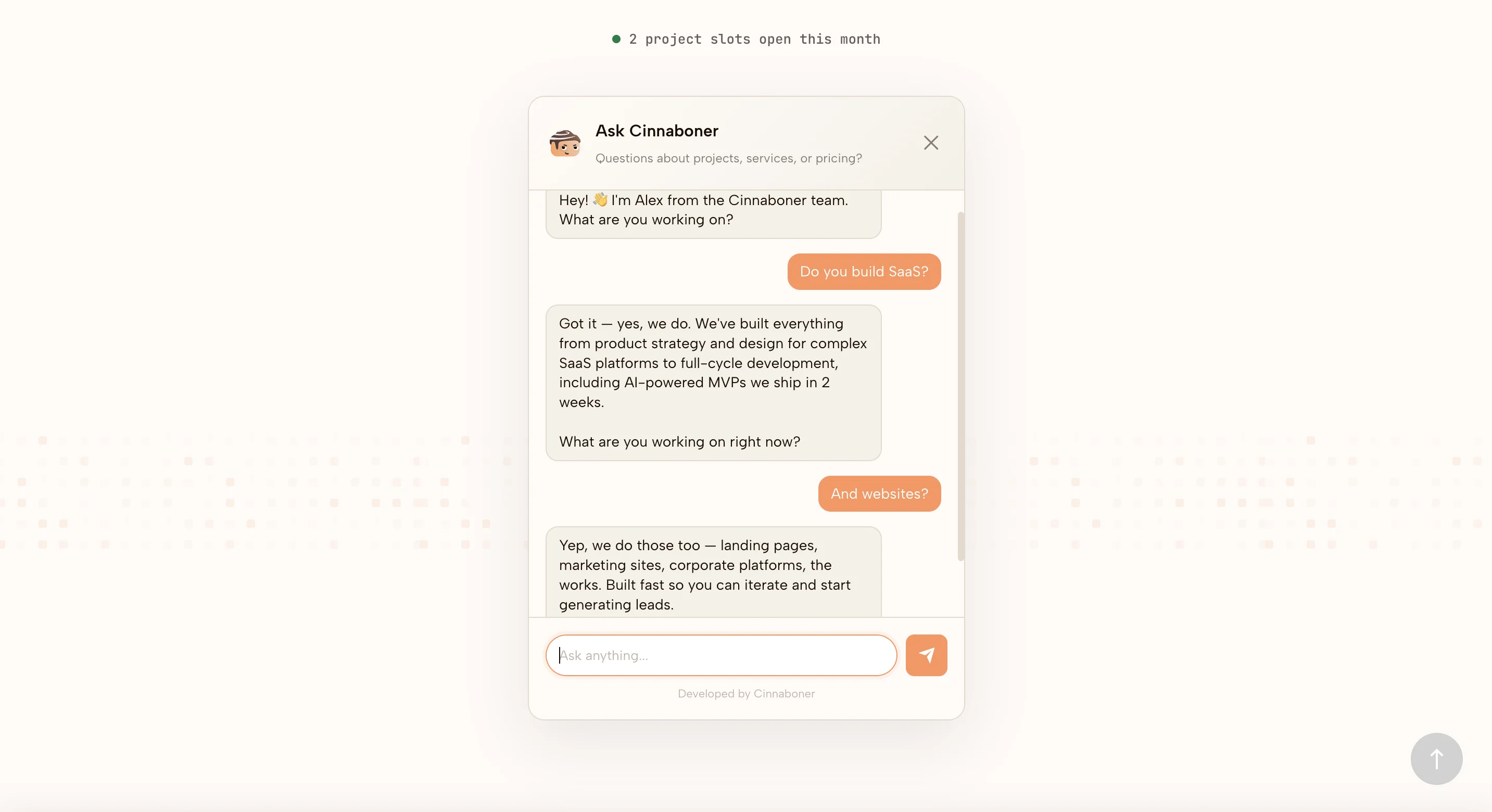
Intercom starts at $39 per seat and climbs fast. Drift starts higher. The new wave of "AI chatbot" SaaS vendors wants $40 a month for a widget that greets your visitors and collects an email. For most studios and small SaaS, that's a bad trade. We run a custom chatbot on cinnaboner.com that costs roughly $5 to $15 a month in API calls, and it does the one job a sales chatbot actually needs to do: qualify the visitor and hand a warm lead to the team.
This is the pattern. It's a 200-line PHP endpoint, a JSON knowledge file, and a Make webhook. If you can host a file and set an environment variable, you can ship it.
The architecture is embarrassingly small
Four pieces. That's the whole thing.
- A widget on the page — plain HTML and a bit of JavaScript. On cinnaboner.com that's
chatbot-widget.html. It holds the conversation state and POSTs to the backend. - A single endpoint —
chatbot-api.php— that receives the turn, builds a system prompt, calls Claude, and returns the reply. - A knowledge file —
chatbot-content.json— with your services, value props, FAQ, and case studies. - A webhook — we use Make — that catches qualified leads and forwards them to Gmail, Slack, or a CRM.
No database. No seat licenses. No vendor portal. You edit one JSON file when you want to change what the bot knows.
The knowledge file is the product
The quality of a small chatbot isn't about the model. Claude Sonnet is already smarter than 99% of the conversations it will have on your site. The quality comes from the knowledge file. Ours is structured like this:
{
  "company": { "description": "...", "tagline": "...", "process": "..." },
  "services": {
    "strategy": [ { "name": "...", "description": "..." } ],
    "design":   [ ... ],
    "development": [ ... ],
    "launch":   [ ... ]
  },
  "faq": [ { "question": "...", "answer": "..." } ],
  "cases": [ { "name": "Oscar Chat", "services": ["UX Audit", "Product Design", "SEO & GEO"] } ]
}
The FAQ block is the single most important field. Treat it as ground truth. In the system prompt we say: "FAQ answers are ground truth — paraphrase, never contradict." That one line stops 90% of the drift you'd expect from a free-form model.
The services list gives the bot vocabulary. The cases list lets it drop a real reference when a prospect asks "have you done anything like this before?" — it can answer "yes, we did the full cycle on Oscar Chat" instead of inventing a project.
The endpoint in plain English
Here's what chatbot-api.php does, step by step:
- Enforce CORS against your domain only.
- Rate-limit by IP — we allow 10 requests per minute, stored in a tiny JSON file in the temp directory. No Redis.
- Sanitise the input. Strip tags. Cap length at 5000 characters.
- Load
chatbot-content.jsonand assemble the system prompt. - Forward the conversation history plus the new turn to the Claude API.
- Scan the response for a
[LEAD_CAPTURED]marker. If it's there, strip it and fire the lead webhook. - Return the cleaned reply to the widget.
That's it. A junior engineer can read the whole file in 15 minutes.
The [LEAD_CAPTURED] marker trick
This is the move worth stealing.
The bot is told to do real discovery for a couple of turns, then offer to connect the visitor with the team. When the visitor gives a name and email, the bot confirms it and appends a hidden tag — [LEAD_CAPTURED] — to the end of the reply. The server sees the tag, strips it before sending to the browser, extracts the email with a regex, and posts the whole conversation to the Make webhook.
The visitor never sees the marker. But it gives us a cheap, reliable signal — decided by the model itself — for when a conversation has become a lead. No brittle keyword matching. No intent classifier. The LLM already knows when it just closed someone; we just let it tell us.
The same pattern shows up in our AI Business Analyst tool — captured emails fire into a Make webhook, Make routes them to Gmail or a CRM. One webhook URL, one environment variable, done.
Rate limiting and history (the two things people forget)
Rate limiting matters because Anthropic's API bills per token, and you do not want a bored visitor to cost you $40 in one afternoon. Our rule is 10 requests per IP per minute. Requests are stored as Unix timestamps in a JSON file named after the IP hash. When the file has 10 timestamps less than 60 seconds old, return HTTP 429. Roughly 15 lines of code.
Conversation history matters because without it the bot feels like a goldfish. The widget holds the array client-side and sends it with every turn, capped at a reasonable length. The server sanitises every past message the same way it sanitises the new one (trust nothing the client sends), then hands the array to Claude as the messages field. Claude handles the rest.
We also pass a turn_count. From turn three onward we inject a small internal nudge into the system prompt: "You should have enough context now — transition to lead capture." That one flag is the difference between a bot that flirts with qualification for ten turns and one that closes by turn three.
Paying $40/month for a chatbot that greets visitors?
We'll replace it with a $10/month custom one that actually qualifies leads. Four hours of setup.
A worked example from our own traffic
A visitor lands on cinnaboner.com from a LinkedIn post.
Turn 1 — Visitor: "Hey, we're building a B2B SaaS for logistics and the UX is a mess." Bot: short acknowledgement, one question — "What stage are you at, pre-revenue or already live?"
Turn 2 — Visitor: "Live, about 200 customers, churn is climbing." Bot: names the likely shape — UX audit plus redesign — and asks when they want to start.
Turn 3 — Visitor: "Next month if we can." Bot: "Sounds like a solid project — let me loop our team in. What's your name and email?"
Visitor gives it. Bot confirms, appends [LEAD_CAPTURED], server fires the webhook. Within a minute the team has the full transcript in Gmail with a subject line we can grep. Total API cost for that conversation: roughly 3 cents.
When not to build this
We'd be bad consultants if we didn't tell you when to pay the $40.
Skip the custom build if you run a high-volume support queue with tickets, SLAs, and agent routing. Intercom and Zendesk are expensive because that plumbing is hard. Skip it if you need SSO, audit logs, and SOC 2 scoped coverage — a bespoke PHP file will not pass procurement at a Fortune 500. Skip it in regulated verticals where every outbound message needs a compliance trail — healthcare, lending, certain fintech flows. Don't ship a 200-line chatbot into HIPAA territory.
For everyone else — studios, small SaaS, manufacturers with a marketing site, anyone whose chatbot exists to qualify a handful of daily visitors — the custom build is the right call. Cheaper, more on-brand, fully owned.
What this actually costs to run
API calls at Sonnet pricing for a conversation of three to five short turns: single-digit cents. Hosting: whatever you're already paying for your site. Make: free tier handles thousands of lead events a month. Rough total for a small studio: $5 to $15 a month. Compare to $40 and then $40 and then $40 again.
Takeaway
A sales chatbot is a lead qualifier with a pleasant voice. The SaaS vendors sell you a platform; you probably need a prompt, a JSON file, and a webhook. Ship the simple thing and spend the $400 a year on something that actually moves revenue.
If you want us to wire this up on your site, book a call.
Own your chatbot. Not a vendor subscription.
One PHP file, one JSON knowledge base, one Make webhook. Wired into your site in a weekend.